
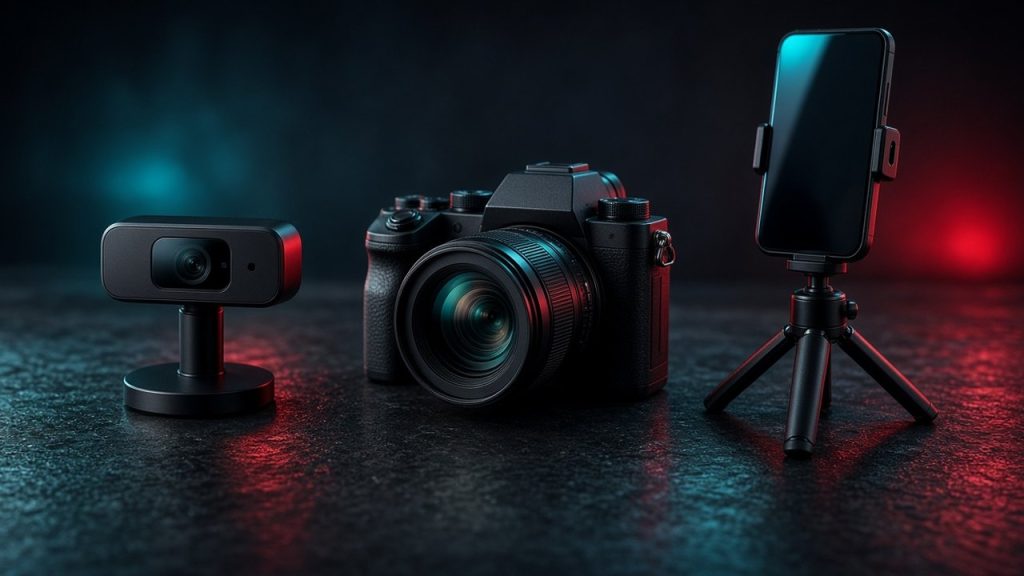
Choosing the right camera gear is one of the most impactful decisions you can make when building a sustainable broadcasting career. Whether you are launching your first show on platforms like Chaturbate or upgrading your existing studio for high-end clients on LiveJasmin, your video quality directly influences viewer retention and earnings. While high-end cinema gear looks impressive on paper, it is rarely the most practical choice for live streaming. You need equipment that balances resolution, frame rate stability, ease of use, and reliability under continuous operation. This comprehensive guide breaks down the core hardware options available today, helping you build a dependable rig tailored to your budget and specific broadcasting style.
Understanding Video Compression and Streaming Realities
Before purchasing expensive hardware, it helps to understand how live streaming platforms handle video data. Major sites compress incoming video feeds to ensure smooth playback for thousands of concurrent viewers across various internet speeds. Even if you broadcast in native ultra-high definition, the platform may downscale your feed to standard 1080p for public rooms. Understanding how platforms process media streams helps you allocate your budget effectively. You can learn more about how public rooms and private shows function in practice by reading How Live Cam Sites Work: Public Rooms, Privates, and Tokens.
Bitrate and Bandwidth Limits
Your internet upload speed is just as important as your camera sensor. Streaming platforms enforce strict bitrate caps to prevent buffering issues for your audience. Pushing an excessively high bitrate through a modest home internet connection will result in dropped frames and stuttering video. Most dedicated webcams and modern capture cards handle these constraints automatically when paired with the right broadcasting software. For an in-depth look at software optimization choices, consult the Browser Broadcast vs OBS for Cam Models guide.
Sensor Size Versus Resolution
Many new broadcasters mistakenly believe that higher megapixel counts guarantee better video quality. In reality, sensor size plays a much larger role in low-light performance and color depth. Large sensors capture more ambient light, reducing digital noise and graininess during evening broadcasts or moody studio lighting setups. A modest 1080p sensor with exceptional low-light sensitivity will almost always outperform a cheap 4K sensor in real-world broadcasting conditions.
Dedicated USB Webcams for Simplicity
Dedicated USB webcams remain the most popular starting point for the vast majority of independent broadcasters. They require minimal technical configuration, connect directly to your computer via a single cable, and integrate seamlessly with almost every broadcasting platform. Brands like Logitech and Razer offer reliable plug-and-play units that deliver crisp video without the steep learning curve of interchangeable lens systems. If you are exploring alternative broadcast styles, you might also look into specialized platforms such as Stripchat or Bongacams where straightforward plug-and-play setups let you focus entirely on your audience interaction.
Pros and Cons of USB Webcams
The primary advantage of a USB webcam is convenience and affordability. You do not need external power adapters, costly capture cards, or complicated lens attachments. However, fixed lenses mean you cannot easily achieve a shallow depth of field or cinematic background blur. Furthermore, zoom capabilities on standard webcams are usually digital rather than optical, which degrades image quality significantly if used too aggressively.
Lighting Requirements for Webcams
Because standard webcams feature relatively small sensors, they rely heavily on external illumination to look their best. Relying solely on overhead room lighting will introduce noticeable digital noise and muted colors. Investing in a basic ring light or softbox setup will instantly elevate a basic webcam feed to professional levels. Proper lighting is often the single most cost-effective upgrade you can make to your existing hardware configuration.
Mirrorless and DSLR Cameras for Maximum Quality
When you are ready to transition from a casual broadcaster to a full-time professional studio, mirrorless cameras and DSLRs offer unmatched visual fidelity. These devices feature large physical sensors, interchangeable lenses, and manual control over aperture, shutter speed, and ISO settings. Pairing a quality mirrorless body with a fast prime lens allows you to create stunning background separation, keeping the focus entirely on you while softening distracting room elements.
Clean HDMI Output and Capture Cards
Using a mirrorless camera for live streaming requires a few extra accessories compared to a standard USB webcam. Your camera must support clean HDMI output, meaning it can send an uncompressed video feed through its HDMI port without displaying on-screen camera menus or battery indicators. You will also need a reliable HDMI-to-USB capture card to convert that video signal into a format your computer recognizes as a standard webcam input.
Power Solutions and Overheating Risks
Traditional cameras are designed for capturing short video clips or still photographs, not for running continuously for hours at a time. Extended live streams can cause certain camera models to overheat or drain standard batteries within minutes. To prevent unexpected shutdowns during a live show, you must invest in a dummy battery that plugs directly into a wall outlet, along with a camera model known for reliable thermal management.
Using Smartphones as High-Definition Broadcast Cams
Modern smartphones feature remarkably advanced camera systems equipped with multiple high-resolution lenses, sophisticated image stabilization, and powerful internal processors. For many creators, using a smartphone is a practical and budget-friendly alternative to purchasing a dedicated camera body. Dedicated apps can turn your phone into a high-end wireless or wired webcam source that integrates smoothly into your desktop broadcasting software.
Advantages of Mobile Broadcasting
Smartphones excel in versatility and mobility. If your broadcasting setup requires dynamic angles or if you stream from multiple locations within your home, a phone mounted on a flexible tripod provides unmatched flexibility. Additionally, flagship phones handle autofocus and exposure adjustments exceptionally well, sparing you from manual fine-tuning during active broadcasts on sites like Camsoda or Flirt4Free.
Limitations and Connectivity Issues
Despite their impressive video quality, smartphones are not without drawbacks. Running intensive streaming apps on a mobile device for hours generates significant heat, which can throttle performance or drain batteries faster than standard chargers can replenish them. You also need to ensure your local Wi-Fi network is robust and stable if you choose a wireless streaming connection, as packet loss on mobile devices can ruin an otherwise flawless show.
Hardware Comparison Matrix
Review this comparison table to evaluate how different camera types align with your technical skill level, budget, and performance goals before making a final purchasing decision.
| Camera Type | Setup Complexity | Low-Light Performance | Estimated Cost |
|---|---|---|---|
| Standard USB Webcam | Low | Moderate | Budget |
| Mirrorless Camera | High | Excellent | High |
| Modern Smartphone | Low to Moderate | Good | Medium to High |
Essential Accessories for a Complete Studio Rig
The camera body itself is only one component of a successful broadcast studio. Surrounding your camera with supportive hardware ensures your stream remains steady, well-lit, and professional. Neglecting these supporting elements often leads to frustrating technical hurdles during crucial live interactions.
- Sturdy mounts or desk arms to eliminate camera shake during movement.
- Continuous lighting kits, such as softbox panels or adjustable ring lights.
- High-speed HDMI cables and reliable USB extension cords.
- External microphones or lavalier setups for crystal-clear audio capture.
- Dedicated power strips with surge protection for all studio electronics.
Frequently Asked Questions
Do I really need a 4K camera to stream live?
No, most streaming platforms downscale incoming video feeds to 1080p to ensure smooth playback for all viewers. A high-quality 1080p camera with good lighting often looks sharper and runs more reliably than a budget 4K camera.
Can I use my old digital camera as a webcam?
It depends entirely on whether your specific camera model supports clean HDMI output and whether the manufacturer provides official utility software to turn it into a USB webcam source.
Why does my webcam video look grainy and dark?
Grainy video is almost always a sign of insufficient lighting. When a sensor lacks adequate light, it boosts its internal ISO sensitivity, which introduces digital noise and visual artifacts.
Is it difficult to set up a mirrorless camera for streaming?
It requires a slightly steeper learning curve than a standard USB device, as you must configure capture cards, power adapters, and manual focus lenses correctly.
Will upgrading my camera automatically increase my earnings?
Better video quality improves viewer retention and makes your studio look more professional, but engaging personality, consistent scheduling, and good interaction remain the core drivers of success.
Bottom line
Investing in the right camera gear depends entirely on your technical comfort level and financial strategy. While high-end mirrorless systems deliver breathtaking cinematic quality, a reliable USB webcam or a modern smartphone paired with excellent lighting can easily get you started on the path to long-term success. Focus on mastering your lighting and audio before spending a fortune on high-end camera bodies.